
Windows VPN – Split Tunnel VPN
Microsoft provides VPN functionality for SSTP, L2TP, IKEv2, and PPTP VPNs, if you have a need to connect to a network to access hosts, but also have more than one subnet at your connection you are establishing the VPN from, then the Split Tunnel VPN is for you.
When using Split Tunnel VPN, you keep all traffic local – Internet, and local subnets all stay on your network you are connecting to the VPN from. When you need to access a host on the other side of the VPN tunnel you can reach that, while all of your other traffic stays local.
How to accomplish setting up a Split Tunnel VPN in Windows.
Go into Control Panels, Network and Sharing Center
Choose Change adapter settings on the left
Right click the VPN connection you wish to change and choose Properties
Click the Networking tab at the top
Click Internet Protocol Version 4 (TCP/IPv4), then click Properties
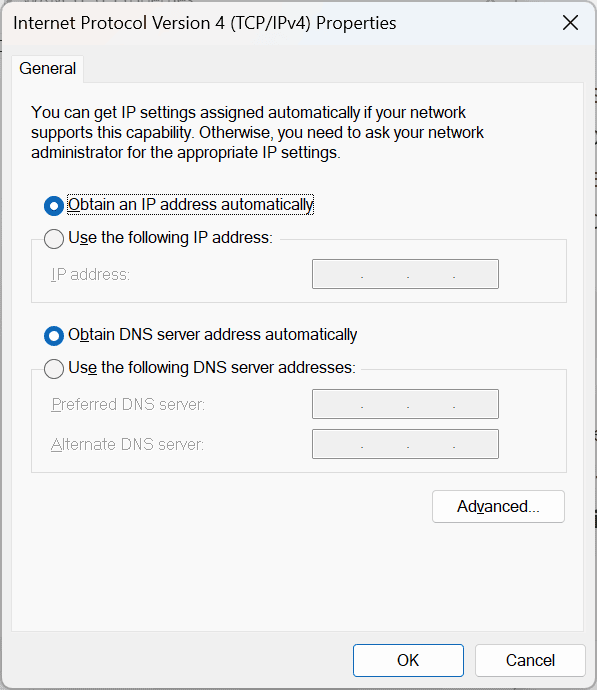
Click Advanced button towards the bottom right
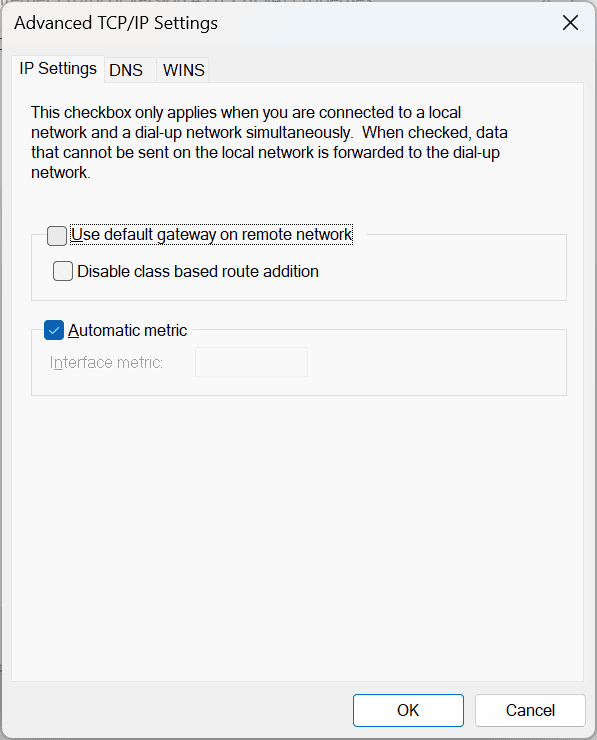
Uncheck – Use default gateway on remote network.
Click OK
Click OK
Click OK
Your VPN connection is now set as a Split Tunnel VPN, and you can reach devices on both sides of the network. Try it out and see how it works.